


Not Sure Which SketchUp Extensions to Use? Start With These

Updated: Apr 2

SketchUp is known for its intuitive modeling experience. But as projects become more detailed, even simple tasks, like editing materials, managing geometry, or refining forms, can start to take more time than expected.
This is where extensions come in, helping you address common workflow bottlenecks in SketchUp.
Rather than adding complexity, the right extensions help streamline repetitive processes, improve model quality, and support a more efficient workflow. With hundreds of options available, the key is not to install more, but to choose what actually supports the way you work.
Here, we highlight a selection of essential extensions to help you work more efficiently in SketchUp!
Managing Model Performance and Accuracy
As models develop, they often accumulate unnecessary geometry and small errors that affect performance and usability.
 CleanUp³Helps remove hidden clutter such as duplicate edges and unused geometry, keeping your model lighter and easier to manage. Pro tip: Always keep a backup before cleaning! |
 Solid InspectorScans your model for issues like gaps or non-manifold geometry, making it easier to correct problems early and maintain a clean, reliable model |
Improving Editing Efficiency
Editing is often the most time-consuming part of the workflow, especially when working across multiple elements or materials.
 Provides better control when working with complex models by enabling faster and more precise selection filtering. |
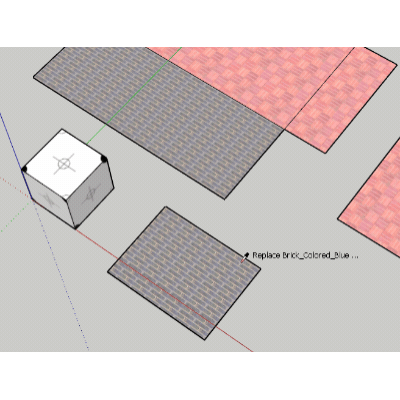 Simplifies the process of updating finishes, allowing you to apply changes across your model quickly and explore different design options with minimal effort. |
Enhancing Design Detail and Flexibility
Interior design projects often require more than basic geometry. Adding detail and variation efficiently is key to creating refined, realistic spaces.
 Allows you to introduce curvature into your models, supporting more organic forms commonly found in furniture and interior elements. |
So, Where to Find Your Extensions?

SketchUp’s extension ecosystem is centered around the Extension Warehouse, an online library where you can discover third-party tools built specifically to enhance your workflow.
With a wide range of free and paid options available, Extension Warehouse allows you to extend SketchUp’s capabilities based on your needs. Each extension is designed to solve a specific problem or improve a particular part of your workflow
Want to find empty spaces in your model? There’s an extension for that. Want to import files from another program like Polycam? There’s an extension for that too.
If you’re not sure where to start, the built-in search makes it easy to explore. You can begin with a general keyword or look for a specific tool, and refine your results by category to quickly find what’s relevant to your work!

Bringing Your Design to Life
As your model becomes more refined, the next step is presenting it clearly.
V-Ray extends SketchUp’s capabilities by introducing realistic lighting, materials, and atmosphere, allowing you to present your designs with greater clarity when communicating ideas to clients or stakeholders.
For interior workflows, it allows you to better understand how light and materials interact, turning your model into a clearer and more complete visual.
To explore V-Ray and other advanced tools, get started with SketchUp Studio or reach out to our team to find the right setup for your workflow.



Comments