
SketchUp 2025: What's New?
Real-time, realistic visuals inside SketchUp
This new SketchUp release takes another step forward in helping creative professionals effortlessly bring their visions to life. It offers enhanced visualization tools and seamless workflows that help you and your team create in SketchUp.
Experience upgraded transitions in and out of SketchUp with the latest IFC improvements. Keep your data intact and your workflow smooth, minimizing the risk of data loss and manual rework while increasing your project's efficiency and reliability.
Create visually stunning work
Unlock powerful new visualization and interoperability capabilities to help you effortlessly bring your vision to life.
Architecture  Invite clients to feel your vision. Create stunning photorealistic visuals that immerse stakeholders in the reality of their spaces, integrating Environments and customizable real-world materials. | Interior Design  Bring your vision to life with compelling visuals that capture the true essence of your designs. Tailor each detail and exceed client expectations with access to libraries of new Photoreal Materials. |
Construction 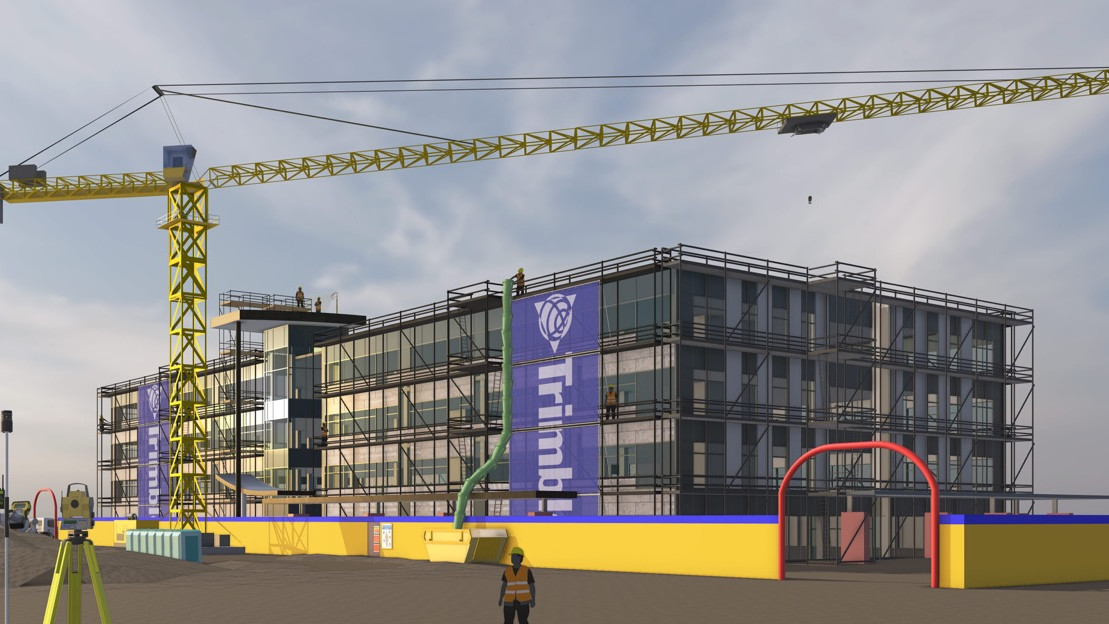 Make bids impactful with previews that use customizable materials and reflect the real world. Streamline logistics and virtual walkthroughs with accurate details to achieve alignment and reduce errors. | Retail  Create immersive experiences that convey ambience and materiality. From in-house merchandising and environmental design to custom build-outs, push the boundaries of visual storytelling to get the sale. |
Environments
The new Environments panel provides options for toggling on and adding 360° image files to SketchUp models, adding a sky dome and lighting for dynamic reflections. You can add and manipulate environments, or import High Dynamic Range Image (HDRI) files or OpenEXR files to create a new environment.
In the Select tab, SketchUp provides a selection of default environments you can add to your model right away. And just like the Materials, Styles, and Components panels, you’ll also see options from custom collections. If you have your own HDRI or EXR files, click to add them to your model. You can also import these files via File > Import.
In the Edit tab, you can adjust how the environment appears in your model with the following options:
Set Sun Location – Designate a point in the environment as the source of shadows in your model. If Shadows aren’t already on, activating this option will also turn on shadows and override the time of day designated in the Shadows panel.
Use Environment as Skydome – Replace the model’s sky with the environment’s photographic backdrop. Activating or turning off this option will not affect the light provided by the selected environment.
Use Environment for Reflections – The chosen environment will act as a reflective light source that photoreal materials can react to.
Tip: 3D Warehouse offers even more environments you can use in your models. To get started, see Environments in 3D Warehouse or take a look at the Environments section of the SketchUp Content Library.
Photoreal Materials
Photoreal Materials are now available as a new face style enabling materials with physically based rendering (PBR) textures to react dynamically to the light and surroundings of a model’s environment.
To support Photoreal Materials, SketchUp uses the following texture maps within a material:
Metalness – Identifies how light would reflect off of a surface. Low metalness materials appear dull and flat, while a high value will cause a material to appear more shiny.
Roughness – Identifies how rough or smooth different parts of a surface are. Low roughness materials appear glossy. roughness materials will appear rough like sandpaper.
Normal – Details a surface with the illusion of depth without changing the shape of an object. A low value decreases detail, while a high value increases detail and may cause the material to look bumpy.
Ambient Occlusion – Creates soft shadows in corners and crevices of the material, giving a more three-dimensional look. Low values make shadows look lighter, while high values make the shadows darker.
Generate Textures
All materials in SketchUp’s default material libraries are now Photoreal Materials. The default library contains a lot of options, but if you want even more options, head on over to 3D Warehouse and search for Materials.
SketchUp can help you create Physically Based Rendering (PBR) texture maps for materials that don’t have them.
With the help of AI, SketchUp will analyze your material and create corresponding texture maps for Metalness, Roughness, Normal, and Ambient Occlusion.
With the help of SketchUp’s new Generate Textures option almost any material can be transformed into a photoreal material
Seamless data management with interoperability updates
New improvements to LayOut
Easily transition from 3D in SketchUp for Desktop to 2D in LayOut with familiar tool behavior. Core LayOut tools now better match the tool behavior in SketchUp, so the transition from 3D in SketchUp to 2D in LayOut is much smoother.
Reintroducing Live Components
Add rich context and iterate on detailed designs faster than ever before. Pre-built configurable objects, known as Live Components, are not new but are officially graduating from SketchUp [LABS].
Subscribers can configure parameters like size, type, and material to create customized objects in a snap — access 200+ new and refreshed components via 3D Warehouse as a full production feature in 2025.
Enhanced IFC compatibility
Experience upgraded transitions in and out of SketchUp with our latest IFC improvements. Keep your data intact and your workflow smooth, minimizing the risk of data loss and manual rework.
New Library in 3D Warehouse
Save time and iterate quicker with a refreshed Content Library that delivers organized, easy-to-access, configurable models, materials and Environments.
Kick-start your project with configurable models, Photoreal Materials, and Environments developed and curated to support our most popular workflows.

Comments